Home>Products>Quick Startup

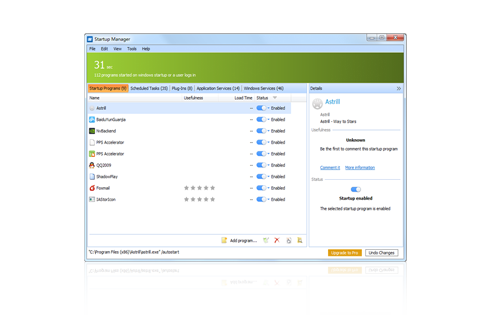
Free startup manager to disable or delay auto-start programs to speed up system boot at most.

Quick Startup

  • Quick Startup
    • Browse all startup entries in an elegant list view.

      Security risk rating for startup entries.

      Get detailed information about individual startup entries.

      Add, edit or delete startup entries.

      Simple and User friendly interface.

  • Download Now2.9 for Windows | Update: Dec. 17, 2011

What is Quick Startup?

Quick Startup is an instant solution to slow PC loading. As its name suggests, it is a quick and simple startup manager designed specially to speed up Windows boot by delaying some programs auto-startup after system boot, or removing unnecessary programs that snatch resources to launch themselves at the system boot. Quick Startup works to arrange the auto-start programs and makes enough resources for system boot, speeding up PC loading to the fastest performance.

Slow Windows Boot?

Do you feel your computer sluggish at booting? When you turn on your computer, there are drivers, services and many other applications start at the beginning of Windows boot. The information that tells Windows to automatically start these items can be located in a number of places, ranging from a program group on your Start Menu, to certain initialization files that are executed when Windows starts, to one of many places in the system registry. These auto-start entries occupy computer memory, which relatively reduces the resource for PC loading and noticeably slows down Windows boot.

Some of the auto-start entries are necessary for normal system functioning, while the rest of them are only to burden system boot and can be easily cancelled from the startup list or delayed to start automatically after Windows Startup. This startup manager tool lets you centrally manage all of these auto-start entries using one single interface. You can easily add, remove, edit, disable, and enable any or all of auto-start entries in order to keep your Windows boot as fast and efficient as possible.

How to Know Whether an Auto-start Program is Necessary or Not?

Quick Startup is a simple and free startup manager for both novices and experienced users. You may do not know much about the programs that starts automatically on system booting. Quick Startup will help you deal with it. It displays a list of all the auto-start entries on your computer.

When you select a startup entry in the list, this startup manager tool shows detailed information on the program at the bottom section, including product name, manufacturer, description and so on. You can even switch to web data base from this startup manager interface for more program information and view comments from other users, and you will know clearly what the auto-start entry is about.

Quick Startup attaches every entry with a rating bar, which indicates the danger level that the entry brings to your computer. The bar consists of red and green. The longer the red part is, the more dangerous the entry is to your computer. These entries are rated by this startup manager according to the company that developed the product, as well as those experienced users who share their comments and experiences with these entries. You can also contribute your comment for further use about the application. The risk rating options are Neutral, Trustworthy and Dangerous.

What does Quick Startup do Mainly to Speed up Windows Boot?

  • Lists all programs that starts automatically at the beginning of Windows Boot.
  • Shows auto-start entry information like product, company, description and user comments.
  • Delays auto-start programs to start 30 seconds(or more) later after system boot.
  • Indicates security index of auto-start programs and shows whether an auto-start program is nenessary or not.
  • Deactivates and deletes entries from auto-startup list to lighten system boot.
  • Allows users to add new startup programs
  • Products
  • Newsletter

Keep up-to-date with news about Glary Utilities

Your email:

  • Testimonials

"It will tell you what what is safe and unsafe and if it doesn't know you can look it up. You can also start and stop processes easily. Incredibly user friendly and easy to use. After you have stopped something from starting up it will stay in your startup menu until you delete it. You can also comment on programs for other users. It will also tell you if it is necessary to your systems start up, user's choice, or not necessary. As another bonus you can add programs you want to start up at startup."

- judtaylor10

download.com

More reviews

  • Awards
Quick Starup wins five star awards from Popular SharewareQuick Starup wins five star awards from BestSharewareQuick Starup wins 5 star software from Excellent Software